
In today’s competitive digital marketplace, businesses need effective ways to reach customers, promote products and build lasting relationships. WhatsApp advertising offers businesses an opportunity to turn interest into conversations, enquiries and sales.
From local shops and restaurants to online stores, service providers and digital marketing agencies, WhatsApp can become a valuable part of a business’s marketing strategy.
Through Meta’s advertising tools, businesses can create campaigns on Facebook and Instagram that open directly into a WhatsApp conversation. Businesses can also use advertising placements within WhatsApp’s Updates tab, including Status ads where available.
The key is to do more than simply advertise a product. Businesses should create relevant offers, make it easy for customers to respond and measure whether their advertising generates real business results.
1. 📱 What Is WhatsApp Advertising?
WhatsApp advertising is the use of paid promotions and messaging-based marketing to attract customers, answer questions, generate leads and encourage purchases.
It includes several approaches:
Click-to-WhatsApp ads: Facebook or Instagram advertisements that open a chat with your business.
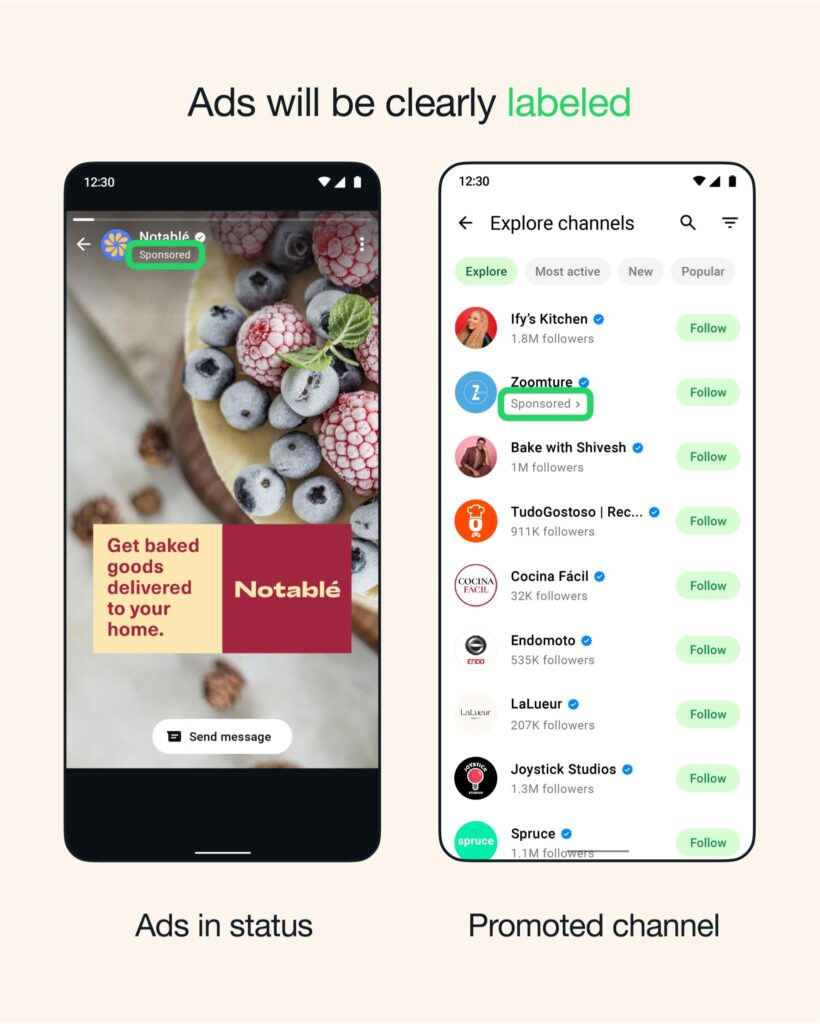
WhatsApp Status ads: Paid promotions that appear between organic Status updates in the Updates tab, where available.
Promoted Channels: Paid discovery opportunities that help people find Channels, subject to availability.
Customer messaging campaigns: Promotional messages sent through supported WhatsApp Business tools to customers who have agreed to receive them.
These approaches serve different purposes. Some help businesses find new customers, while others help existing customers discover new offers or return to purchase again.
2. 🎯 Key Types of WhatsApp Advertising
1. Click-to-WhatsApp Ads
Best for: Leads, enquiries and sales
These advertisements appear on placements such as Facebook and Instagram feeds, Stories and other eligible locations. When a customer taps the call-to-action button, a WhatsApp chat with the business opens.
Example: A Welkom furniture store advertises a lounge suite with the message, “Interested in this special? Chat with us on WhatsApp for prices and delivery options.”
2. WhatsApp Status Ads
Best for: Brand awareness and product discovery
Status ads appear between people’s organic Status updates. They can feature images or videos and direct interested viewers to a WhatsApp conversation or a website, depending on the campaign setup.
Example: A local restaurant promotes its weekend family meal special with an attractive vertical video and a “Chat Now” call to action.
3. Promoted WhatsApp Channels
Best for: Growing an audience and brand visibility
Promoted Channels are designed to help users discover Channels in the directory. A business can use its Channel to share announcements, product news, educational content and updates.
Example: A community media brand promotes its Channel to attract followers interested in local news, events and business updates.
Availability of promoted Channels and advertising features may vary by region and rollout.
4. WhatsApp Business Catalogue and Messaging
Best for: Product enquiries and repeat sales
A WhatsApp Business catalogue lets businesses display products and relevant details inside WhatsApp. Businesses can then use conversations to answer questions, recommend products and help customers complete orders.
Catalogue features are not themselves paid advertisements, but they can support the customer journey after an ad generates an enquiry.
3. 📢 WhatsApp Status and Channel Advertising: What's the Difference?
Status and Channels both appear within WhatsApp’s Updates area, but they serve different marketing purposes.
Feature | Status Ads | Promoted Channels |
|---|---|---|
Main goal | Attract attention and drive action | Help people discover a Channel |
Content experience | Full-screen photos and videos between organic updates | Channel discovery through the directory |
Potential action | Open a chat or visit a website | Discover and follow a Channel |
Best suited for | Specials, services, events and product launches | News, educational content, community updates and brand content |
Meta announced these advertising and discovery features in 2025, with availability expanding gradually. Not every business or region will necessarily have access to every feature.
Important for South African businesses: Check the available placements and destination options in your own Meta Ads Manager account before planning a campaign around Status or Channel advertising.
4. 🚀 Core Benefits of WhatsApp Advertising for Businesses
Use Meta’s advertising audience tools to introduce your business to people who may be interested in your products or services.
Customers can ask about prices, availability, specifications, bookings and delivery without completing a long contact form.
Friendly, helpful and personal conversations allow businesses to understand customer needs and explain their offerings.
Guide customers from their initial enquiry to a quote, order, appointment or purchase.
With appropriate customer consent, use supported messaging tools to share relevant offers, new products and useful updates.
Track conversations, qualified leads, purchases and cost per result to understand which campaigns are worth continuing.
Meta’s official WhatsApp Business resources describe click-to-WhatsApp advertising as a way to support lead generation, sales and customer engagement across the customer journey.
5. 🛠️ How to Set Up WhatsApp Ads via Meta Ads Manager
You can create WhatsApp advertising campaigns using Meta Ads Manager. The precise interface and available options may differ depending on your account, campaign objective and regional feature availability.
1
Prepare your WhatsApp Business account
Complete your business name, profile photo, description, business hours and contact details.
Add a product catalogue if appropriate.
Create a greeting message and an away message.
Ensure that someone can respond to incoming enquiries.
Connect your business assets
Open Meta Business Suite or Ads Manager and ensure your Facebook Page, advertising account and eligible WhatsApp Business number are correctly connected. Complete any verification or setup requirements shown in your account.
Create a campaign
Open Ads Manager, select Create, and choose a suitable objective. Depending on your goal and available setup, options may include Engagement, Leads, Traffic or Sales.
Select WhatsApp as the messaging destination
At the ad set level, look for the conversion location or messaging destination settings. Choose messaging apps and select WhatsApp where supported. For eligible campaigns, choose optimisation settings that align with the result you want, such as conversations or leads.
Define your audience
Choose your target locations, relevant audience characteristics and any suitable custom audiences. A local business can start by focusing on its actual service area instead of paying to reach people who cannot realistically become customers.
Set your budget and schedule
Choose a daily or lifetime budget, where available, and set the campaign dates. Begin with a controlled test budget that your business can afford to lose while learning which creative and audiences perform best.
Design your advertisement
Upload a clear image, video or carousel where supported. Write concise copy, explain the customer benefit and add a direct call to action such as Send WhatsApp Message or Chat Now.
Preview, publish and monitor
Check your creative, destination, budget, audience and messaging experience before publishing. Once the ad is approved, monitor its performance and improve it using actual results.
For the current official setup guide, visit the WhatsApp Business guide to creating click-to-WhatsApp ads
What if you want to advertise directly in WhatsApp Status?
Check the dedicated WhatsApp Ads in Status and Channels page. Meta’s newer Status advertising options are rolling out gradually, so a placement may not appear in every account or region. Do not assume that a Facebook or Instagram ad automatically includes WhatsApp Status placement.
6. 📈 Best Practices for Maximising WhatsApp Advertising ROI
Return on investment (ROI) is not about generating the highest number of clicks. It is about generating profitable business results from the money you spend.
10 practical ways to improve results
Show the actual product, service or experience you are promoting. Use clear photography, readable text and a design that attracts attention on a mobile screen.
Explain how your offer solves a problem, saves time, provides convenience or delivers value. Customers need a reason to respond.
For a business serving Welkom, for example, focus on customers within its realistic delivery or service area. Broaden the audience only when the business can serve it.
Use one clear call to action: “Request a Quote”, “Book Today”, “View Our Specials” or “Chat to Us”.
A good advertisement can lose its value if enquiries remain unanswered. Use greeting messages, saved replies and clear procedures to help your team respond efficiently.
Compare two or more headlines, images, offers or calls to action. Change variables methodically and keep the versions that generate better-quality leads.
A clear, relevant offer is often easier to measure than a general advertisement. Examples include a limited-time discount, free consultation, seasonal special or introductory service.
Measure how many people message you, how many enquiries are qualified, how many quotes are accepted and how many sales result.
Provide useful customer service and request permission before sending ongoing marketing messages. Avoid repetitive promotions that annoy customers.
Hundreds of low-quality enquiries may be less valuable than a small number of profitable customers. Focus on the business outcomes that matter.
Meta also offers advertising measurement options, including the Meta Pixel, Conversions API and offline conversion tracking, where applicable. These can help businesses connect campaign activity with results beyond the initial conversation.
7. 💰 How to Calculate WhatsApp Advertising ROI
o understand whether your advertising is profitable, record your ad spend, sales and other relevant costs.
The basic formula is:
For a more useful business assessment, include the cost of advertising and any other costs directly attributable to the campaign.
Example: A local business advertising on WhatsApp
Illustrative campaign results — not a performance guarantee
Advertising spend
R2,000
Qualified enquiries
80
Customers gained
12
Sales revenue
R12,000
Revenue divided by ad spend
6× ROAS
Cost per customer acquired
R166.67
ROAS (return on ad spend) = R12,000 ÷ R2,000. This is not the same as profit or ROI because product costs, operating expenses and other costs are excluded.
Use the following calculator to estimate your own campaign results.
WhatsApp Campaign ROI Calculator
Estimated profit after entered costs
R6 000,00
Estimated ROI
100.0%
ROAS
6.00×
Cost per acquired customer
R166,67
Estimates depend on accurate revenue attribution and complete cost data. If revenue is not profit, include all relevant costs before judging campaign profitability.
8. 🔐 Privacy, Consent and Responsible Advertising
Successful WhatsApp marketing requires customer trust.
Businesses should follow these principles:
Obtain appropriate consent before sending ongoing promotional messages.
Respect opt-outs and requests to stop receiving marketing.
Avoid buying contact lists or sending unsolicited bulk promotions.
Handle customer contact details and personal information responsibly.
Follow WhatsApp Business policies, Meta advertising policies and applicable South African data-protection requirements, including POPIA.
Make sure advertised prices, offers and claims are accurate.
WhatsApp’s own advertising information states that personal messages and calls remain end-to-end encrypted and are not used to show ads. Status and Channel advertising is separate from personal chats.
9. 📣 WhatsApp Advertising Ideas for Different Businesses
Advertise daily specials, family meals and delivery services. Invite customers to WhatsApp for the menu or to place an order.
Promote new arrivals, seasonal offers and product bundles. Let shoppers ask about stock, sizes and collection options.
Advertise plumbing, electrical work, repairs, cleaning or maintenance. Encourage customers to request quotes or arrange appointments.
Promote website design, social media management, SEO and Google Business Profile services. Offer a free initial discussion or business visibility assessment.
Property Businesses 🏡
Advertise property listings, viewing appointments and rental opportunities. Use WhatsApp to respond to questions and arrange viewings.
10. ✍️ Example of an Effective WhatsApp Advertisement
Here is an example that a local business could adapt for Facebook or Instagram.
Want more customers to discover your products and services?
📱 Connect with us directly on WhatsApp!
✅ Get answers to your questions
✅ Request a quote
✅ Discover our latest offers
Your next customer could be one message away!
Call to action: SEND WHATSAPP MESSAGE
The strongest advertisements combine a specific audience, a compelling benefit and a simple next step. Tailor the copy to the product or service you are actually selling.

Conclusion: Make WhatsApp Part of Your Digital Marketing Strategy
WhatsApp advertising can help businesses turn online attention into meaningful customer conversations. By combining click-to-WhatsApp campaigns, available Status advertising, useful Channel content and responsive customer service, businesses can create a more direct path from discovery to purchase.
The key to success is to target the right audience, offer genuine value, respond promptly and measure profitable results.
For businesses in Welkom and throughout South Africa, WhatsApp can complement websites, Facebook pages, Instagram marketing and local business directories. Start with one clear campaign, measure the results and improve your strategy as you learn what customers respond to.
About the author: Frank Jonker is a web designer and digital marketing specialist associated with Welkom City Stad and Welkom City Digital Marketing Agency.
Explore digital marketing services and business resources at www.welkomcity.africa
Article prepared by Frank Jonker. Advertising features, availability and Ads Manager workflows may change as Meta continues updating its products.